


Transact Mobile Ordering
4.61.29K Reviews
App Specs
- Version
- 2026.3
- Updated On
- License
- Free
- Downloads
- 100,000+
- Developer
- Transact Campus Inc.
- Categories
- Food & Drink
- Platform
- Android
Screenshots
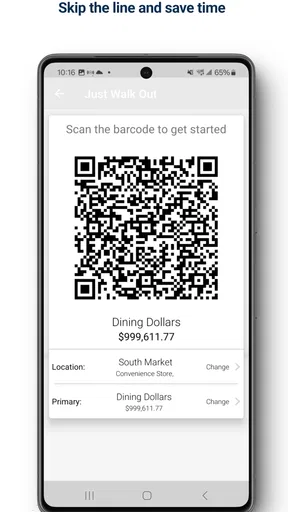
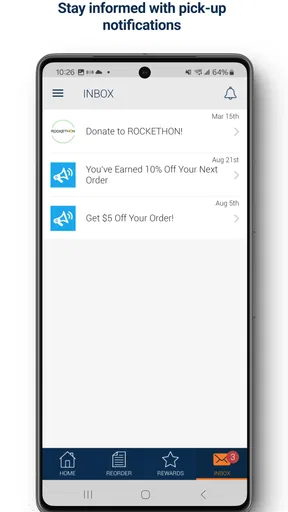
 Analysis by AppCompare
When I look at a campus food app, I care less about how polished the menu feels and more about whether it removes a real interruption from my day. Transact Mobile Ordering is built around that single promise: place an order, pay through the app, and collect it without standing through the usual ordering process. In my experience, that focus makes it most useful during crowded breaks, when saving a few minutes matters more than browsing an elaborate restaurant platform.
This is a free Food & Drink app from Transact Campus Inc., aimed at people using participating campus dining services. It is available to everyone by age rating, supports devices running Android or iOS version 10 or later, and has been available since September 2018. The current release is version 2026.3. Its store presence is substantial, with more than 100,000 installs, a 4.5 average from roughly 6,700 ratings, and about 1,300 written reviews.
Those figures suggest that the basic idea works for many users, but they do not change the important question: will it be useful at your particular campus? This is not a general restaurant marketplace that I would open to search every nearby café. Its value depends on whether the dining locations you actually use are connected to the Transact ordering service and whether their menus fit the way you eat.
Ordering ahead is the feature that changes the routine
I find ordering ahead most useful when it changes what I can do with a short break, not simply when it moves a few taps onto my phone. The next section looks at how that shift plays out in everyday campus routines—and why the best results come from matching the order to your route and available time.
What the central capability really solves
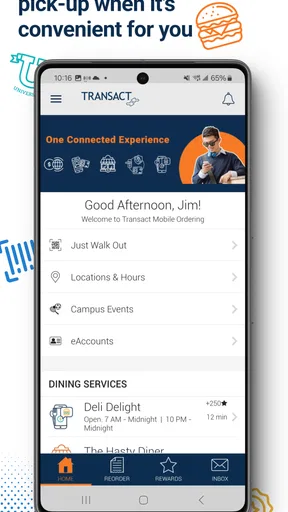
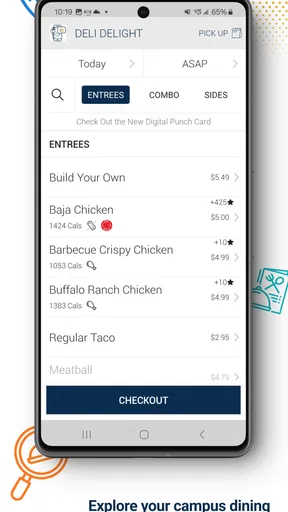
The main capability is mobile ordering for pickup. Instead of joining a line and deciding at the counter, I can make the selection before arriving, submit the order, pay in the app, and go to the relevant pickup point. That sounds simple, but the practical benefit is that it separates the decision from the busiest part of the meal.
For a student moving between classes, that separation can be more valuable than a larger menu. I can consider what I want while walking across campus or sitting in a study area, then use the pickup visit for the final handoff rather than the entire ordering process. The app is therefore less about discovering food and more about reducing friction around a meal I was already going to buy.
I also like that the workflow gives ordering a clear beginning and end. The useful mental model is not “browse until something looks interesting,” as it might be with a delivery service. It is “choose from the campus options, confirm the purchase, and collect it.” That narrower purpose keeps the app relevant for repeated routines, especially when I already know which location and meal I want.
Worth Reading Before You Choose

EA SPORTS FC Mobile 26 Is a Bigger Football Game, but It Takes Time

Flipboard Shows What News Apps Must Do Beyond the Feed

Switching to Android Auto Means Rethinking Your Driving Routine

Google Calendar Makes a Crowded Week Easier to Manage

Ludo King Makes the Most of the Minutes Between Plans

Baby Panda World Brings Quick Play to Modern Phones, but Its Game Library Feels Busy
How I would use it during a busy day
A realistic example is a short gap between lectures. I open the app before leaving the previous building, check the available campus dining choice, select a meal, review the order, and complete payment. On reaching the location, I look for the designated pickup process and collect the order. The time saved is not necessarily dramatic on every visit, but avoiding the queue can make the difference between eating comfortably and carrying food into the next class.
The best habit is to order before I reach the busiest point, not after arriving and seeing a line. That is a small but important distinction. The app can move the ordering task earlier, but it cannot guarantee that the kitchen, counter, or pickup area will be free at the moment I arrive. I would still leave enough time for preparation and collection rather than treating a mobile order as an instant handoff.
There is another useful workflow for regular meals. I can use the app to repeat a familiar decision pattern: choose a known location, select the item I already trust, check the total, and submit. This is where the service feels more efficient than a full delivery app. I am not comparing dozens of restaurants, delivery charges, or arrival estimates. I am making a focused campus purchase.
Payment makes the process more deliberate
Paying inside the ordering flow is important because it keeps the handoff from turning into another transaction at the counter. I can finish the purchase before reaching the pickup point, which is especially helpful when I am carrying books, using one hand, or trying not to delay a group of friends.
At the same time, I would always review the order carefully before confirming it. Mobile ordering makes it easy to tap through familiar choices quickly, and that convenience can become a weakness if I do not check the selected location, items, quantities, or final amount. A short review before payment is worthwhile because correcting a mistaken order may be less convenient after submission than it would have been while speaking directly with staff.
I would also keep the app as a convenience rather than my only way to get food. If my phone battery is low, the connection is unreliable, or I need to ask a detailed question about an item, the ordinary counter may be the better option. The app is strongest when the order is straightforward and the digital path is working normally.
Where it differs from delivery and ordinary counter service
Compared with a delivery app, Transact Mobile Ordering has a very different purpose. A delivery platform is useful when I want food brought to a chosen address or when I am comparing independent restaurants. This app is better when I am already on campus and willing to collect the meal myself. I avoid the extra distance and the broader, slower browsing process, but I also give up the convenience of having food brought to me.
Compared with ordering at the counter, the advantage is predictability in the decision stage. I can order away from the queue and arrive with the purchase already arranged. The tradeoff is that a face-to-face interaction is often better for unusual requests, quick substitutions, or questions that are not clearly handled in the digital menu. If I need personal guidance, the counter can still be more flexible.
Compared with a campus dining website, a dedicated mobile workflow can feel more practical when I am moving around. A phone is already in my hand, and the order can be placed without finding a desktop or standing near the venue. However, I would not assume that every campus location, menu item, or dining rule appears in exactly the same way. The connected campus service determines how complete the experience feels.
The best scenario is a predictable meal during a narrow break
The clearest use case is a student or staff member with a short, known break and a campus dining location along the route. Imagine having ten minutes between buildings, already knowing that a particular café or dining counter is the practical choice. Ordering ahead lets me make the selection before the break begins, walk there while the order is being prepared, and spend the remaining time eating rather than waiting to order.
This also works well for a small group when everyone can agree on a simple plan. One person can coordinate the pickup while the others continue toward the destination. The benefit is not just speed; it reduces the awkward pause where everyone stands in line while deciding separately. Still, I would be cautious with a large group or complicated custom orders. A group order can become harder to check, and a mistake affects more than one person.
Another strong scenario is a repeat purchase at a familiar campus venue. The less I need to investigate, the more the ordering-ahead feature earns its place on my phone. If I visit the same dining location several times a week, avoiding the same queue repeatedly can make the app feel worthwhile even when each individual saving is modest.
Three practical habits that improve the experience
- Order before the rush reaches its peak. Placing an order while approaching the venue may still leave me waiting if many other orders are already ahead. I use the app earlier when my schedule is tight.
- Check the pickup location twice. A campus can have several dining points that look similar in a hurry. Confirming where the order should be collected prevents the convenience of ordering ahead from becoming a last-minute walk across campus.
- Keep a counter-service backup. If I need an ingredient explanation, a special request, or help resolving an unclear item, speaking with staff is often more effective than forcing the situation through a fixed mobile menu.
These habits reveal an important tradeoff: the app shifts responsibility toward me. I gain control over when I place the order, but I also need to read the details, choose the right pickup point, and arrive with realistic expectations about preparation time.
Where the convenience has limits
The biggest limitation is that mobile ordering cannot solve every part of campus dining. It does not automatically make a busy kitchen faster, remove a crowded pickup area, or guarantee that a preferred item will be available when I arrive. The app improves the ordering channel; it does not replace the physical operation behind it.
That distinction matters when timing is critical. If I have only a few minutes and no flexibility, I may still prefer the closest available counter rather than placing an order whose preparation could overlap with my schedule. I would also avoid relying on it for an important event or travel connection unless I had enough margin to handle a delay or an incorrect selection.
The focused design can be a limitation for people who expect a complete food marketplace. I would skip it if my main goal were restaurant discovery, home delivery, broad price comparison, or finding food away from campus. A general delivery service or the dining provider’s own broader platform may suit those needs better. This app makes sense when campus pickup is already the destination.
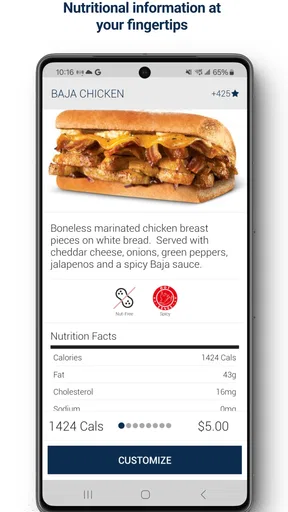
There is also a human element that digital ordering cannot reproduce. A staff member can sometimes explain a menu item, notice confusion, or help adjust an order in a way a fixed interface cannot. For routine choices, I prefer the app. For unfamiliar food, dietary questions, or a complicated request, I would use the direct service channel when available and avoid assuming that a mobile menu covers every nuance.
What the ratings and platform details tell me
The app’s 4.5 average and roughly 6,700 ratings indicate that the core ordering experience has been well received overall. I see that as encouraging, but I would interpret it alongside the service’s campus-specific nature. A positive experience at one connected dining operation may not perfectly predict the menu, pickup flow, or reliability at another.
Its free price is another practical advantage. There is no purchase cost just to try the ordering workflow, so I can test it against one normal meal rather than committing to a subscription. The more meaningful question is whether using it saves enough effort to become part of my routine. If I usually face no line, order only unusual meals, or spend most of my time away from participating campus locations, the benefit may be too small.
The current version, 2026.3, shows that the app continues to be maintained as a current product rather than an abandoned utility. I would still keep the operating-system requirement in mind: devices need version 10 or later. For someone using an older phone, compatibility should be checked before planning around the app.
Who gains the most from it
I think the strongest audience is made up of students, faculty, and campus staff who regularly buy meals from connected dining locations and often work under time pressure. It is especially useful for people who already know what they want, dislike waiting in lines, and can reach pickup points at predictable times.
It can also help someone who prefers to make food decisions privately. Instead of feeling rushed while a queue forms behind them, they can review the available choices at their own pace and submit the order when ready. That is a quieter benefit than speed, but it makes the experience more comfortable for some users.
I would recommend trying it if your campus dining routine is repetitive and your breaks are short. Start with a simple order at a location you know, verify the pickup instructions, and compare the experience with your normal counter visit. That test will tell you more than the general rating because the real advantage depends on your route, your dining venue, and how crowded it is when you usually eat.
I would not make it my first choice if I rarely eat on campus, need delivery, often change orders at the counter, or depend on detailed personal assistance. In those situations, the app’s narrow focus becomes a constraint rather than a benefit. The free download makes experimenting easy, but convenience is not the same as universal usefulness.
My final take on the ordering workflow
Transact Mobile Ordering succeeds because it concentrates on one everyday problem: turning a campus meal into a planned pickup instead of a queue-based interruption. In my use, that is a meaningful improvement when the venue is familiar, the order is uncomplicated, and I place it early enough for the kitchen’s workload to matter less to my schedule.
I would recommend it to anyone who regularly eats at participating campus locations and wants a faster, more organized way to order and pay. I would approach it as a practical tool, not a replacement for every kind of food service. Its real strength is the gap between deciding what to eat and arriving to collect it. If that gap is where your day usually loses time, the app is worth trying; if your needs are broader than campus pickup, a different food app will probably serve you better.
Pros
- Quickly reorder favorite meals from participating restaurants.
- Menu details and prices are easy to browse before ordering.
- Order status updates help you follow the preparation process.
- Supports convenient pickup without waiting in a long line.
- Useful for workplaces
- campuses
- and venues using Transact services.
Cons
- Only works with restaurants and locations connected to Transact.
- Availability and menu options vary significantly by venue.
- Some orders may include service fees or venue-specific charges.
- Pickup times can change during busy periods or unexpected delays.
- Account or payment issues may require contacting the specific venue.
FAQs for Transact Mobile Ordering
What is Transact Mobile Ordering, and what can I use it for?
Transact Mobile Ordering is a mobile food-ordering service commonly used by colleges, universities, workplaces, and other managed dining locations. After signing in through a participating institution, users can browse available menus, customize eligible items, place orders, and collect them from designated pickup areas. The exact features, menus, locations, and ordering times depend on the organization operating the service.
Do I need an account or a specific institution to use Transact Mobile Ordering?
Yes, access is generally connected to a participating school, campus, employer, or organization rather than being completely open to everyone. You may need to sign in with institutional credentials or create an account linked to an approved dining program. Before downloading, check whether your university, workplace, or venue supports Transact Mobile Ordering, because the app may offer limited functionality if no participating location is associated with your account.
How do I place an order and collect it through the app?
Once signed in, select an available dining venue, review its current menu, choose your items, and make any permitted modifications before adding them to your cart. The app normally displays pickup instructions and an estimated preparation time after checkout. When you arrive, follow the venue’s collection directions and show the order confirmation if requested. Busy periods, sold-out items, and changing kitchen schedules can affect pickup times.
What payment methods does Transact Mobile Ordering support?
Payment options vary according to the institution and the dining locations connected to your account. Depending on the setup, you may be able to use a campus meal plan, dining dollars, stored account funds, a linked card, or another payment method approved by the organization. Review the payment screen carefully before confirming an order, since taxes, service charges, balances, refunds, and cancellation rules may differ between participating venues.
Can I cancel, change, or receive a refund for an order?
Cancellation and refund availability usually depends on whether the venue has started preparing your order and on the policies established by the participating institution. Some orders may be changed or canceled shortly after submission, while others become final immediately. If an item is unavailable, the order is delayed, or you experience a payment problem, use the in-app support options or contact the dining location directly with your order details.


